Control with context
Keep the peak, ceiling, and gain movement visible while you make the decision.
HIGH ACCELERATION LIMITER
HAL is a focused peak-control workspace for mix and mastering engineers who want to shape movement, compare honestly, and keep the session moving.
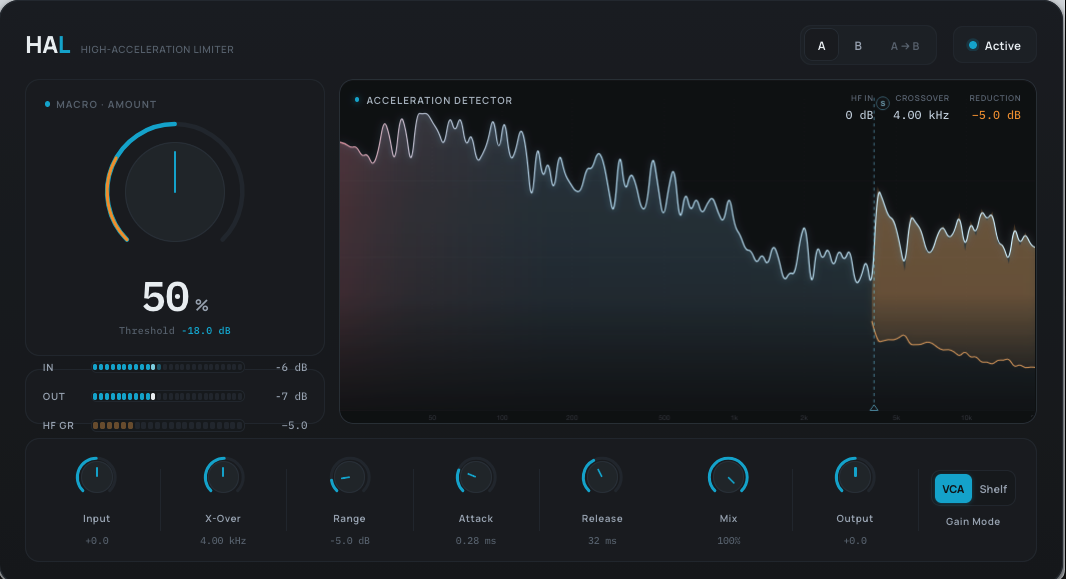
HAL brings the working controls, level context, and visual feedback into one concentrated view—without turning the last stage into a maze.
Keep the peak, ceiling, and gain movement visible while you make the decision.
A focused control surface keeps iteration close to the sound instead of the setup.
The launch demo is held back until its on/bypass sources are aligned and level-matched.
Product state stays in the session; license credentials and authorization files stay out of it.


HAL is arranged around a short working loop: set the target, shape the response, and compare the result in context.
Establish the peak-control target for the current mix or master.
Adjust the response while keeping level and gain behavior in view.
Return to the source intent before committing the next move.
A matched on/bypass comparison belongs here only when the source, timing, fades, and perceived level have been reviewed.
The targets below are shown for planning. They do not become a shipping support claim until Release and QA complete the host matrix and publish the signed release.
Enter your license key inside HAL. Keep your purchase receipt for license recovery and purchase support. No ParagonDSP account is required to activate.
When sales open, choose HAL and continue to ParagonDSP's FastSpring checkout.
After payment is confirmed, use the license key in your purchase receipt and download the signed installer for your computer.
Open HAL, select Activate, and enter your license key. No ParagonDSP account or browser handoff is required.
HAL verifies its signed local authorization and refreshes it in the background when a connection is available.
The perpetual model, two-computer allowance, and HAL 1.x update rights are approved. Launch price and currency remain absent until approved.
Launch price pending
The storefront is in dark launch. Checkout stays closed until the licensing staging proof, signed installer, legal copy, and production rollout gates pass.
Select Activate inside HAL, enter the license key delivered after your verified purchase, and let HAL install the signed local authorization. No ParagonDSP account or browser handoff is required.
Your verified purchase provides a HAL license key. Keep it private and enter it only in HAL or on the Paragon DSP offline-authorization page linked from HAL.
Yes. A connected authorization is valid for 30 days and HAL attempts a refresh every 48 hours when possible. HAL warns during the final seven days and provides a seven-day full-function grace period after expiry.
Yes. Export an offline request from HAL, use a connected device to enter the request and your license key on the Paragon DSP offline-authorization page, choose Generate Offline Authorization, then import the signed response into HAL. No ParagonDSP account is required. The authorization lasts 365 days and uses one of the same two activation slots.
The public release page will list immutable signed packages, checksums, version details, and signing status for every approved platform.
The level-matched HAL comparison and signed installers go public only after their launch gates pass.